
User Center
All doc
System Applications
Jobs and Requisitions
Interview&Offer
Candidates&Talent pool
Recruitement Process
Hiring Manager
Operation Manual
BI Report
Basic Instruction
Common Questions
Why did the Candidate not Receive the offer attachment docum
Whether a candidate's rejection of an Offer is automatically
How to View Closed Position
How to Modify an Interview
Can an Offer be Sent Only after it is Approved?
How to wnload the onboarding registration form (or application form)
How to Add a Candidate to Blacklist
How to Download Candidate CVs
How to Add a Candidate
How to Add a New Position
How to Manage the Reasons for Eliminating Candidates
Will Deleting a Candidate Send a Rejection Letter?
How to Modify Job Requisitions (HC Content)
How to Operate Archived Candidate
Recipients don't Receive Emails
How to Activate Candidates in the Talent Pool
How to Switch and Log in Your Other Companies?
How to Create a New Arrangement Assessment Template
Team Member Permissions List
How to Close a Position (End a Recruitment)
How to Cancel an Interview
Headhunter elf-check function and why the status of headhunter recommended resume appears to be refused
How to Modify The Interview Invitation Template
The Application Scene of Registration Form
Send Rejection Letter/Set Rejection Letter Template
How to Set up HR Access to Recruiting Channel
Headhunter Protection Period is Not Set But Still Shows.
How to Manage Job Authority
How to Batch Jobs
How to Handover the Account
Note from the Candidate Owner
How to Add Tags to a Candidate? How Tags are Managed?
The Account is Already Occupied When Adding a New Account
How to Use Internal Referrals
How to Use Headhunter Management
Note from the Candidate Owner
Last updated 2023/11/28   Reading number 3

1. How to become the candidate owner

The user who first operates the application of the candidate by transferring its stage is the candidate owner.


The user who recommends the candidate to the hiring department for screening and transfers to the next stage is automatically regarded as the candidate owner.


If automatically forwarded to the hiring department, when the candidate is scheduled for an interview, sent Offer or transferred stages, the operator is candidate owner.

2. How to modify the candidate owner
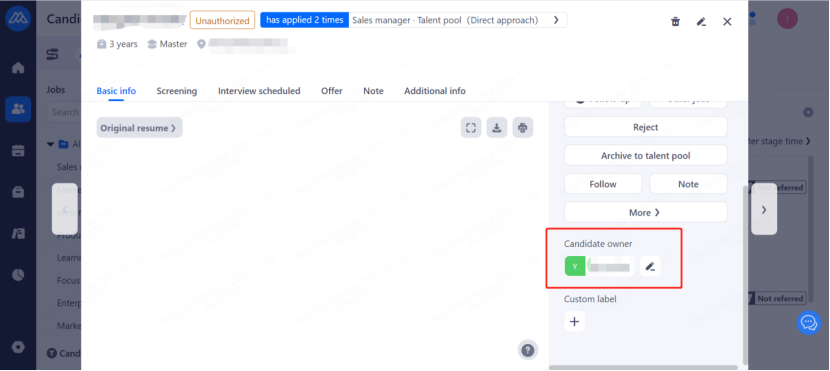
The range of account roles who can modify the candidate owner:

    Super Admin, Admin, Current candidate owner


The range of account roles who can manually edit the candidate owner:

    Super Admin, Admin, Position holder and facilitator

3. Filtrate of candidate owners

Filtrate of candidate owners is supported in Candidates and Talent Pool.


Optional scope: HR, Admin, Super Admin of the same department or subordinate department of the current user. And Super Admini can see all HRs and the above users.


The filtrate of multiple candidate owners at the same time is supported.
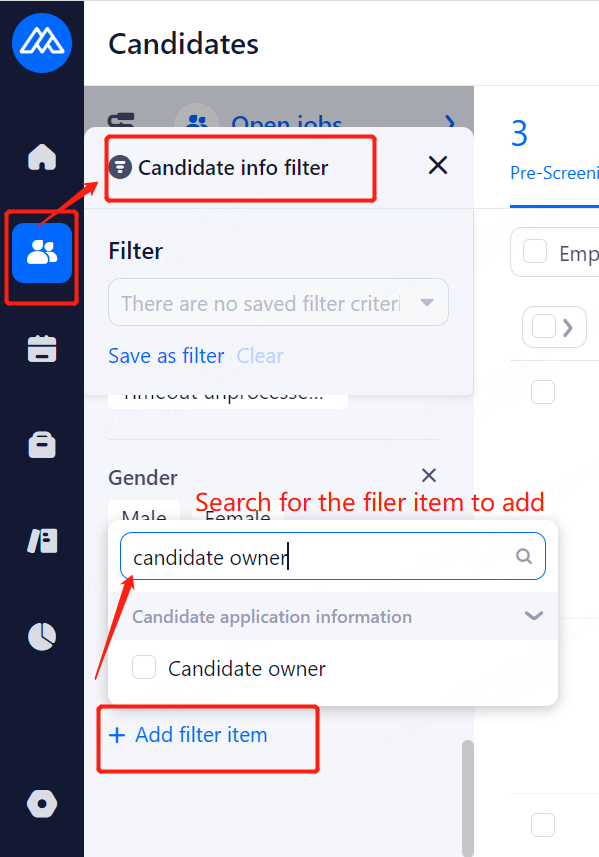
Table of Contents
1. How to become the candidate owner
2. How to modify the candidate owner
3. Filtrate of candidate owners
